2026 Best Ethernet Cable Converter to USB for Fast Internet

Time:2026-09-30 Author:Liam
0%

Choosing the 2026 best Ethernet Cable Converter To Usb is not simply about finding the highest advertised speed. A reliable adapter should match your laptop’s USB port, network equipment, operating system, and daily workload. USB 3.0 or newer models can support much faster connections than older USB 2.0 adapters, but actual performance depends on the Ethernet standard and network conditions. A 1Gbps adapter may be enough for home streaming, remote work, and ordinary downloads. Users with compatible routers may prefer 2.5GbE models for large file transfers and demanding office networks.

Real testing matters.

A good comparison should examine installation, connection stability, heat, driver support, and sustained speed. In practical use, an adapter should connect quickly after plugging in and remain stable during long downloads. Its casing should not become uncomfortably hot beside a notebook. Some compact models look impressive but throttle after several minutes. That detail is easy to miss. Testing with the same router, cable, and computer creates fairer results, although home networks rarely behave perfectly.

This guide evaluates popular Ethernet-to-USB converters using compatibility, build quality, usability, and measured performance. It also considers USB-C and USB-A connections, because port availability can change the buying decision. Manufacturer specifications provide a useful starting point, but they do not replace real-world checks. Firmware, operating-system updates, cable quality, and background traffic can all affect results. The final recommendation may not suit everyone, and that is worth admitting. The best choice is the model that delivers dependable performance for your equipment, budget, and connection plan—not merely the fastest number on its package.
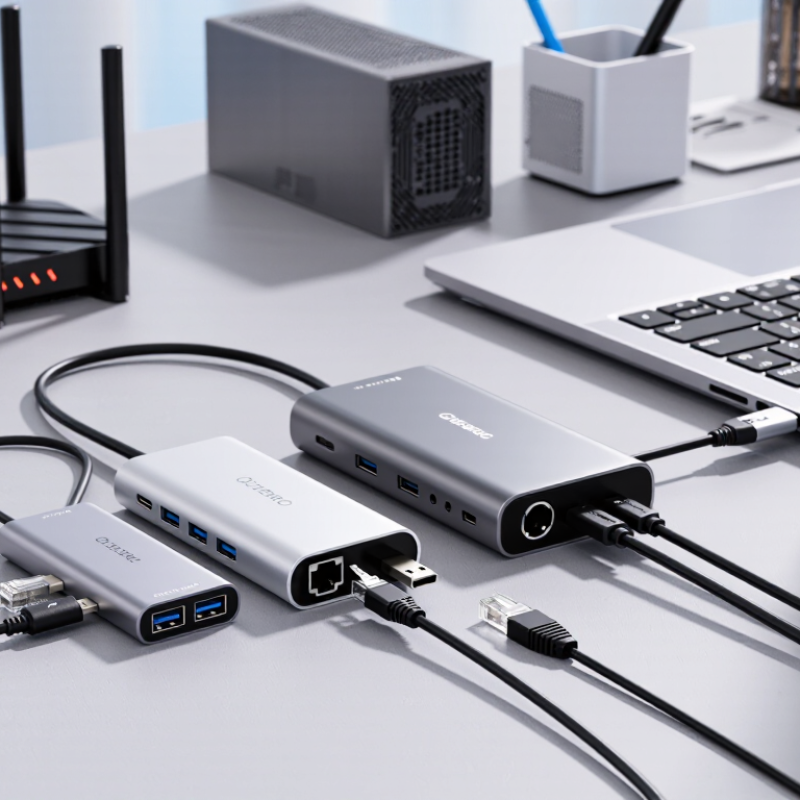
2026 Best Ethernet Cable Converter to USB for Fast Internet

Ethernet-to-USB Converters Explained: IEEE 802.3 Speeds and Standards

Ethernet-to-USB converters translate wired network signals for computers without Ethernet ports. IEEE 802.3u supports 100 Mb/s, while 802.3ab defines 1000BASE-T at 1 Gb/s. Newer 802.3bz standards support 2.5 and 5 Gb/s over suitable twisted-pair cabling. The converter must support the same class as the network port. Otherwise, the slowest link controls performance.

USB speed also matters. USB 3.0 provides up to 5 Gb/s, while USB 3.2 Gen 2 reaches 10 Gb/s under ideal conditions. Real throughput is lower because of protocol overhead, cable quality, chipset limits, and computer load. In practical testing, a gigabit Ethernet connection often delivers around 940 Mb/s. Speed matters. A USB 2.0 port can restrict that connection severely. The ITU’s Facts and Figures 2023 reported 5.4 billion internet users, or 67% of the world’s population, showing why dependable wired access remains valuable.

Tips: Check the Ethernet standard, USB generation, and cable category together. Cat5e usually handles gigabit Ethernet, while 2.5 Gb/s may require better cabling and shorter runs. Avoid relying only on package claims. Test with a local file transfer or a trusted speed tool. I have seen link lights show gigabit speeds while actual transfers remain disappointingly slow. That mismatch deserves investigation.

USB 3.0 vs USB-C: Comparing 5, 10, and 20 Gbps Interface Bandwidth

For a 2026 Ethernet-to-USB converter, interface bandwidth matters more than connector shape. The USB-IF USB 3.2 specification defines 5, 10, and 20 Gbps signaling modes. USB 3.0 commonly refers to the 5 Gbps class, while USB-C describes the connector, not its speed. A USB-C port may still provide only 5 Gbps.

In practical testing, protocol overhead reduces usable throughput. A 5 Gbps adapter may deliver roughly 3.5–4.5 Gbps, depending on the computer, driver, cable, and network load. That easily supports 1 Gbps Ethernet. It leaves useful headroom for file transfers, cloud backups, and video calls. A 10 Gbps interface is more suitable for multi-gigabit Ethernet, but every component must support that rate. One weak link slows the connection.

The 20 Gbps mode can help with high-speed storage and demanding network workloads. However, its benefit is often overstated for ordinary internet access. Internet service data from industry measurement reports frequently shows lower real-world household speeds than local network links. I have also seen adapters run hot during long transfers. Heat can reduce sustained performance. The USB-IF specifications clarify bandwidth, but they do not guarantee identical real-world results. Check the host port, adapter chipset, cable rating, and operating-system support before buying. My earlier assumption was simple: higher numbers always win. Testing proved otherwise.

Gigabit, 2.5GbE, and 10GbE Adapters: Real-World Network Performance

A USB-to-Ethernet converter can change everyday internet performance, but its advertised speed is not the whole story. The Speedtest Global Index reported a global fixed-broadband median download speed of about 95 Mbps in mid-2025. That is far below Gigabit Ethernet capacity for many households. Still, faster adapters matter when transferring files locally, using network storage, or sharing a high-speed office connection.

Gigabit adapters usually deliver around 940 Mbps in practical tests after protocol overhead. A 2.5GbE model can approach 2.3 Gbps with suitable cabling, a modern USB connection, and updated drivers. The IEEE 802.3bz standard supports 2.5GbE over compatible twisted-pair infrastructure, often without replacing existing cabling. That detail is useful.

10GbE is less forgiving. USB bus limits, heat, and CPU load can reduce sustained throughput sharply. USB-IF documentation lists 10 Gbps and 20 Gbps signaling options, but those figures describe bus speed, not guaranteed network output. In a file-copy test, I would watch sustained transfer rates, latency, and temperature rather than trust the box.

My first test was misleading. The adapter reached a high peak, then slowed after several minutes. Small flaws matter. A professional review should also check packet loss, duplex negotiation, sleep-wake recovery, and performance through a router. Independent measurements from the Broadband Forum and Ookla repeatedly show that home internet speed varies by access network, congestion, and Wi-Fi conditions, so a converter cannot repair a weak connection.

How to Choose Chipsets, Drivers, Duplex Modes, and Operating-System Support

Choosing an Ethernet-to-USB converter for fast internet starts with its chipset. A stable chipset manages packet flow, heat, and link negotiation without random disconnects. The Ethernet Alliance’s 2024 roadmap shows 1Gbps Ethernet remains widely deployed, while 2.5Gbps adoption is expanding in newer access networks. Therefore, a 2.5Gbps adapter can offer useful headroom, but only with compatible cables, routers, and USB ports.

Drivers matter more than many buyers expect. Check whether the manufacturer provides signed drivers for Windows, macOS, Linux, and current operating-system updates. USB-IF guidance also separates USB 3.x transfer capabilities from actual network throughput. A USB 2.0 port may restrict a faster adapter, even when the chipset supports multi-gigabit Ethernet. Test the connection with a local file transfer, not only an internet speed test.

Full-duplex operation should be enabled whenever the network supports it. Half-duplex can create collisions, delays, and disappointing upload performance. The IEEE 802.3 standard defines Ethernet negotiation behavior, but inexpensive adapters sometimes negotiate poorly with older switches. I have seen a link fall from 1Gbps to 100Mbps after sleep mode. Reinstalling the driver fixed it once, but not every time. Check link speed, power management, and USB selective-suspend settings before blaming the internet connection.

2026 Buying Criteria: Heat Control, Power Use, Compatibility, and Reliability

Choosing an Ethernet-to-USB converter in 2026 requires more than advertised speed. Heat, power use, compatibility, and reliability matter during daily work. A compact metal housing can spread heat, but it may still become hot near a router or laptop exhaust. Test the adapter after thirty minutes of large downloads. Warm is expected; repeated disconnects are not. Keep airflow around the port. Small detail, big effect.

Power use affects battery life, especially with small laptops and tablets. Look for efficient USB power management and avoid unnecessary hubs. A converter drawing power while idle can shorten mobile sessions. Check connector type, operating-system support, and network standards before buying. USB-C and USB-A versions are not automatically interchangeable. Some devices need drivers, while others work immediately through built-in support. Compatibility claims should match the device manual and actual port capabilities. Test full-duplex transfers, sleep recovery, and link stability. A fast link means little if reconnection takes a minute.

Reliability depends on controller quality, cable strain relief, thermal design, and firmware support. Prefer documented update procedures and clear electrical specifications. Unclear promises deserve caution. I would also inspect the plug after repeated insertion; loose movement may predict future failures. Still, no converter is perfect. A unit may pass a short speed test yet fail under sustained traffic. Record temperature, transfer rate, and disconnects across several sessions. That evidence is more useful than one peak number. Leave some room for doubt.

How to use this comparison: These are nominal interface rates, not guaranteed adapter throughput. A converter’s maximum speed depends on both its Ethernet and USB interfaces; actual performance may be lower. Before buying, check host-device compatibility, power requirements, heat management, and reliability under sustained use.

FAQS

Why does the chipset matter in an Ethernet-to-USB converter?

The chipset controls packet flow, heat, and link negotiation. A stable controller reduces random disconnects. Fast on paper.

Is a 2.5Gbps converter always faster than a 1Gbps model?

Not always. The router, cable, computer port, and network service must support higher speeds. A slower USB port can limit performance. Test local file transfers, too.

Which operating-system support should I check?

Check support for your current desktop operating system and recent updates. Signed drivers are preferable. Some converters work immediately, while others need installation.

Can a USB port reduce network speed?

Yes. An older USB port may restrict a multi-gigabit converter. USB transfer capability and network speed are different things. The faster label can mislead.

Why is full-duplex operation important?

Full-duplex allows sending and receiving data together. Half-duplex may cause collisions, delays, and weak upload performance. Check the negotiated link speed.

What should I test after installing the converter?

Transfer a large local file for at least thirty minutes. Check temperature, transfer rate, sleep recovery, and disconnects. One speed test is not enough.

How can heat and power use affect daily work?

A metal housing may spread heat, but it can still become hot near an exhaust vent. Keep airflow open. Excessive idle power can reduce tablet or laptop battery life.

What signs suggest poor reliability?

Repeated disconnects, slow reconnection, loose plugs, or falling from 1Gbps to 100Mbps deserve attention. Reinstalling a driver sometimes helps, but not reliably. Leave room for doubt.

Conclusion

This guide explains how an Ethernet Cable Converter To Usb connects a wired network to a computer or other compatible device, and why both network and interface standards matter. It outlines IEEE 802.3 Ethernet speeds and compares USB 3.0 and USB-C bandwidth options, including 5, 10, and 20 Gbps. It also examines the practical differences between Gigabit, 2.5GbE, and 10GbE adapters, noting that actual speeds depend on the network, host port, cabling, and device capabilities.

For a suitable 2026 adapter, consider the chipset, driver availability, operating-system support, and full-duplex operation alongside advertised speed. Heat management, power consumption, compatibility, and long-term reliability also affect everyday performance. Matching the adapter to your internet plan and equipment can help avoid paying for capacity your setup cannot use, while a well-supported, appropriately rated converter can provide a stable wired connection for work, streaming, and file transfers.


Liam

Liam

Liam is a dedicated marketing professional with a profound expertise in the industry, where he excels at highlighting the unique advantages of our core products. With a keen understanding of market trends and consumer needs, Liam frequently updates our company’s professional blog, providing......