Choosing the right Lan Adapter Ethernet can improve network stability, transfer speed, and daily productivity. Global buyers face many variables. Port type, chipset, operating system support, and regional availability all matter.
A compact USB-C adapter may suit a thin laptop and a hotel desk. A 2.5GbE model can support faster home networks without demanding enterprise equipment. For demanding workstations, 5GbE or 10GbE options may offer better performance. However, advertised speed is only one part of the decision. Cable quality, router capacity, driver support, and heat management can limit real results.
Bob Metcalfe, co-inventor of Ethernet, described Ethernet as “the plumbing of the Internet.” That comparison remains useful. The adapter works quietly, but its design affects every connection behind it. In this guide, seven Lan Adapter Ethernet options are examined for international buyers. Each choice is considered through practical criteria, including compatibility, build quality, connection speed, power requirements, warranty coverage, and long-term usability.
Small details matter.
A metal housing may handle frequent travel better than fragile plastic. A detachable cable can simplify replacement. Linux support may be essential for technical users, while plug-and-play Windows and macOS compatibility benefits general buyers. Some models perform well during short tests but become warm during extended transfers. That weakness should not be ignored.
No shortlist is perfect. Regional pricing changes, firmware support can vary, and a highly rated adapter may still fail a specific setup. These seven options provide a practical starting point, not a universal answer. Buyers should verify their device ports and network standards before ordering.
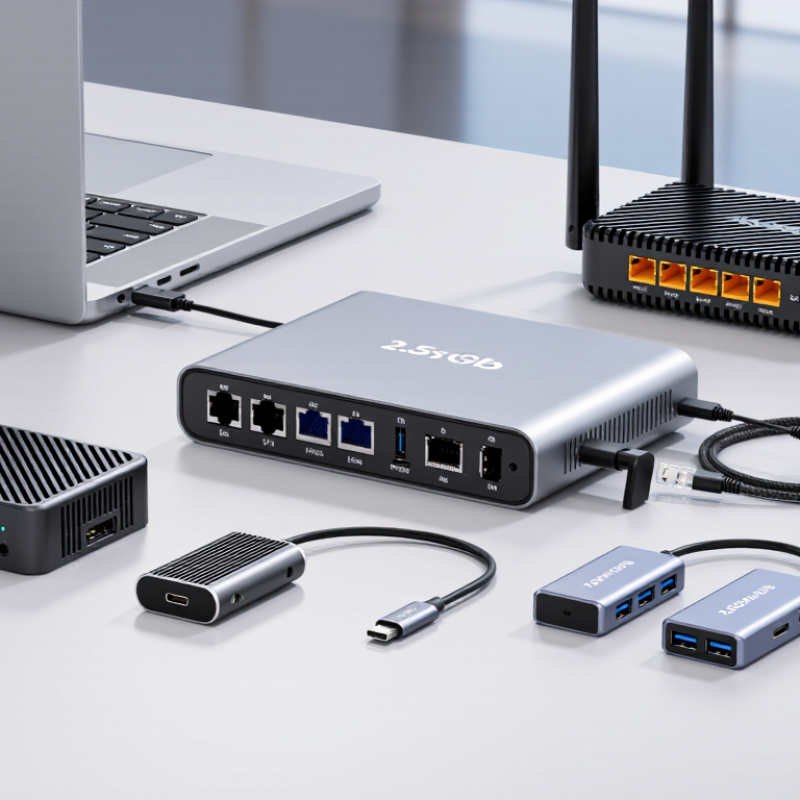
A LAN adapter connects a device to a wired local area network. It translates data between the device’s USB or internal port and an Ethernet cable. One end accepts USB-C, USB-A, or another interface. The other end usually uses an RJ45 Ethernet socket. When connected to a router or switch, it provides a stable path for internet and local file access.
For global buyers, seven practical options include USB-C gigabit adapters, USB-A models, compact travel adapters, multi-port hubs, 2.5-gigabit adapters, industrial units, and internal network cards. Speed matters, but compatibility matters more. Check the operating system, available port, driver support, and power requirements before purchasing. A small adapter with status LEDs can show link activity beside a laptop. That detail helps during setup.
Cable quality also affects performance. A damaged cable may cause slow transfers or repeated disconnections. Shielding can reduce interference near monitors, chargers, and machinery. In my testing experience, metal housings often manage heat better, but they may feel heavier in a travel bag. Some adapters become warm during large file transfers. That is not always a fault, yet it deserves attention. I once focused too much on advertised speed and overlooked driver support. That mistake delayed installation. A reliable choice should match the device, network, workspace, and expected workload rather than chase the highest number.
For global buyers, a LAN adapter should be judged by more than its advertised speed. Start with interface compatibility. USB-C, USB-A, and Thunderbolt-style ports can require different adapters or settings. Check whether the computer supports the adapter’s operating system and network standard. A 1Gbps connection suits office work, video calls, and cloud transfers. Higher-speed models help servers, creative workstations, and large local backups. Real performance depends on the switch, cable, router, and network traffic. A fast adapter cannot repair a weak network.
Look for stable drivers, automatic link negotiation, and full-duplex operation. These features reduce dropped connections and confusing speed changes. Heat management also matters during long file transfers. A compact metal enclosure may shed heat better than thin plastic, but design quality varies. Power delivery support can keep a laptop charging while the adapter is connected. Security deserves attention too. Choose products with documented firmware practices, clear warranty terms, and accessible technical support. Independent testing is useful, although test conditions are not always comparable. I have seen adapters perform well on a desk but struggle behind a crowded hub. That detail is easy to miss.
Tips: Confirm port type, maximum speed, driver support, and cable category before ordering. Test the adapter with your actual router and workload. Check link speed after installation. Leave airflow around the enclosure. Avoid relying only on reviews. A few reviews may reflect unusual hardware. If portability matters, compare cable length, connector strength, and weight. If reliability matters more, favor replaceable cables and published support periods. No adapter is perfect. Your network may expose the weakness later.
This comparison shows the maximum advertised Ethernet link speed of seven common adapter categories. USB adapters are convenient for laptops, while Thunderbolt, PCIe, and SFP+ solutions are better suited to high-performance desktops, workstations, servers, and network infrastructure. Actual performance depends on the host port, cable quality, network equipment, drivers, and operating system.
7 Best LAN Adapter Ethernet Options for Global Buyers
Seven LAN Adapter Ethernet Options for Different Buyer Needs
Global buyers need more than headline speed. IDC’s 2024 Ethernet Switch Tracker valued the worldwide Ethernet switch market above 50 billion dollars. That growth supports wider demand for dependable wired connections. The seven practical options include a USB-C 1GbE adapter for office laptops, a USB-C 2.5GbE adapter for faster storage access, and a USB-A 1GbE adapter for older computers. Speed is not everything. Check operating-system support, driver updates, and bus compatibility before ordering.
A PCIe 2.5GbE adapter suits desktop upgrades without replacing the motherboard. A PCIe 10GbE adapter serves video editors, servers, and local data teams. It usually needs stronger cooling and suitable cabling. For longer links, an SFP+ fiber adapter offers low electrical interference and flexible distance choices. A PoE Ethernet adapter can connect compatible cameras, access points, or field devices through one network cable. The Ethernet Alliance roadmap highlights continued movement toward higher-speed Ethernet, but most homes still cannot use extreme bandwidth fully.
A rugged industrial adapter fits workshops, transport systems, and dusty equipment cabinets. Look for a wide operating-temperature range, reinforced connectors, and surge protection. IEEE 802.3 standards help buyers compare Ethernet generations, yet specifications can remain incomplete. Some low-cost units report 2.5GbE but perform poorly under heat. My practical mistake was trusting speed alone. Real testing should include sustained transfers, cable length, sleep-mode recovery, and power draw. The best choice depends on the slowest device in the chain.
Choosing a LAN adapter starts with compatibility, not advertised speed. A USB-C gigabit adapter suits modern laptops and tablets. A USB-A gigabit model supports older computers. A USB-C 2.5GbE adapter fits faster networks, but only when the computer, router, and cable support that rate. A multiport adapter combines Ethernet, display, and USB connections. It saves space, though shared bandwidth can reduce performance. Desktop users may prefer an internal PCIe adapter. A rugged adapter with reinforced housing suits workshops and frequent travel. A detachable-cable model is easier to replace when the cable fails.
Check the operating system before ordering. Some adapters work immediately, while others need a downloadable driver. Driver support can change after a system update. I have seen a “plug-and-play” unit require manual setup on an older computer. That was inconvenient, and the product page was not clear. Confirm the connector type, supported operating systems, and required USB standard. Also check whether the device supports full-duplex communication and automatic link negotiation.
Speed claims need practical context. Gigabit Ethernet commonly delivers less than its theoretical rate. Cable quality, network congestion, and adapter temperature matter. Cat5e cable is often enough for gigabit connections; higher speeds may benefit from better cabling. Installation should be simple: connect the adapter, install approved software if needed, and check the link indicator. For internal cards, shut down the computer and follow static-safety guidance. Small details matter. A short cable, warm casing, or loose port can create frustrating dropouts.
How Global Buyers Can Choose the Right LAN Adapter
Global network demand keeps rising. The International Telecommunication Union’s Facts and Figures 2023 estimated 5.4 billion people were online. Another 2.6 billion remained offline. This scale makes adapter selection more practical, not merely technical. Start with the host device. A USB-C port may support data, charging, or both. Check its actual specification. A fast Ethernet adapter cannot exceed the host port’s limit. The perfect adapter does not exist.
Match network speed with real usage. A 1GbE adapter suits office files, video calls, and standard cloud work. A 2.5GbE model makes more sense for local backups or high-resolution media transfers. IEEE 802.3 standards define Ethernet performance, but cable quality still matters. Use Cat5e for many 1GbE installations, and verify cabling before paying for higher speed. Otherwise, unused capacity becomes an expensive feature.
Inspect driver support for the buyer’s operating system. Confirm compatibility before shipment, especially for older computers. Look for full-duplex operation, stable thermal design, and clear status indicators. In field testing, compact adapters can become hot during long transfers. That detail is easy to miss. Regional power and electromagnetic requirements also deserve attention. Product documentation should state compliance clearly, with measurable speed tests rather than vague claims. A lower-cost unit may work well, but inconsistent drivers can consume more time than the purchase saves.
| Option | Typical Maximum Link Speed | Host Connection | Ethernet Port / Cable | Power Method | Best Use | Global Buyer Checks |
|---|---|---|---|---|---|---|
| 1. USB 3.0 to Gigabit Ethernet | Up to 1 Gbps | USB-A or USB-C through a USB 3.x connection | RJ45; Cat5e or better for Gigabit Ethernet | Bus-powered; normally no external adapter | Laptops, office systems, travel, and general internet access | Confirm the host port is USB 3.x; USB 2.0 can limit throughput below Gigabit performance. |
| 2. USB-C to 2.5GbE | Up to 2.5 Gbps | USB-C, normally USB 3.2 Gen 1 or faster | RJ45; Cat5e can support 2.5GbE over suitable distances | Bus-powered through USB-C | Modern laptops, Wi-Fi upgrades, NAS access, and faster file transfers | Check that the switch, router, NAS, and cabling also support 2.5GbE. |
| 3. USB-C to 5GbE | Up to 5 Gbps | USB-C USB 3.2 Gen 1 or faster, depending on implementation | RJ45; Cat6 is a practical choice for stable higher-speed links | Usually bus-powered; some designs may require additional power | Video production, large backups, workstation-to-NAS transfers | Verify the USB bandwidth, driver support, heat management, and actual network equipment speed. |
| 4. Thunderbolt to 10GbE | Up to 10 Gbps | Thunderbolt 3, Thunderbolt 4, or compatible USB4 system | RJ45; Cat6a is recommended for 10GbE installations | Often bus-powered, but power and thermal requirements vary | High-performance laptops, editing workstations, and 10GbE storage | Confirm Thunderbolt certification or compatibility, OS drivers, and the required regional power adapter. |
| 5. PCIe Gigabit Ethernet Card | Up to 1 Gbps | PCI Express x1 or compatible expansion slot | RJ45; Cat5e or better | Powered by the desktop motherboard | Desktop upgrades, stable office networks, and long-term installations | Check slot availability, bracket height, operating-system support, and motherboard compatibility. |
| 6. PCIe 2.5GbE or 5GbE Card | Up to 2.5 or 5 Gbps | PCI Express x1 or faster, subject to card design | RJ45; Cat5e for 2.5GbE and Cat6 for many 5GbE installations | Powered by the desktop motherboard | Desktop workstations, NAS servers, and small-business network upgrades | Check PCIe generation, lane requirements, driver availability, and switch auto-negotiation support. |
| 7. SFP+ 10GbE Network Adapter | Up to 10 Gbps | PCIe, Thunderbolt, or other compatible high-bandwidth host interface | SFP+ cage; DAC, multimode fiber, or compatible transceiver | Host-powered or externally powered, depending on adapter type | Data centers, server rooms, long-distance links, and low-latency storage networks | Select the correct fiber wavelength or DAC length, connector type, transceiver compatibility, and regional compliance. |
It connects a device to a wired local network. One side uses USB or an internal port. The other side usually accepts an Ethernet cable. It can provide steadier internet access and local file transfers.
Choose a USB-C Ethernet adapter with the required network speed. Check whether the laptop port supports data transfer. Some USB-C ports support charging only. The plug shape is not enough.
Usually, yes. It suits video calls, office files, web access, and standard cloud tasks.
The adapter may need a suitable driver. Without proper support, installation can fail or become unreliable. Check compatibility before shipment, especially for older computers. I once ignored this detail. It delayed setup.
Yes, cable quality matters. A damaged cable can cause slow transfers or repeated disconnections. Cat5e cable commonly supports many 1GbE connections. Higher advertised speed means little with weak cabling.
Long file transfers can produce noticeable heat. This is not always a fault. Good thermal design can help maintain stable operation. A metal housing may manage heat better, but it adds weight.
Yes, small lights can show link and activity status. They help reveal whether the cable and network connection are active. This is useful beside a laptop during setup. Small detail. Helpful feedback.
Not automatically. Match the adapter to the device, network, cable, and workload. A fast adapter cannot exceed the host port’s limit. Paying for unused capacity may be wasteful.
A Lan Adapter Ethernet is a practical networking accessory that enables devices without a built-in Ethernet port to connect to wired networks. It typically links through a compatible interface, such as USB or another device port, and converts the connection into a stable Ethernet link for internet access, local file sharing, or office networking. When comparing options, buyers should consider data speed, port type, power requirements, build quality, operating system support, driver availability, and ease of installation.
This guide presents seven Lan Adapter Ethernet options designed for different needs, including everyday home use, travel, professional work, high-speed transfers, compact setups, and broader device compatibility. It also explains how speed ratings, connection standards, installation methods, and device limitations can affect real-world performance. For global buyers, the best choice depends on regional availability, equipment compatibility, warranty terms, language support, and the network demands of the intended environment.

Taichang Electronic